
Key takeaways
- Best overall for iPhone & iPad: Vision Board ++ — 4.9★ from 9,602 ratings; unlimited boards free, $19/yr for the slideshow with music and spoken affirmations; home-screen widgets and streaks.
- Best for a quick photo collage: Dreamer — clean phone-sized boards from a large image library, about $20/yr.
- Best for full design freedom: Vizzy — arrange images, quotes and affirmations freely and pin the board to your home screen; All Access from $14.99.
- Best for goals with action steps: Horizons — boards plus a daily, weekly or monthly action tracker, $13/yr.
- Best for Feng Shui (Bagua) boards: Vision Board 2027 — one picture per life area of the Bagua map, $25/yr.
- Free alternative: Hero21 Habit Tracker (our app) — unlimited vision boards and habit tracking for free, with big goals and milestones next to your board.
Pick the app you will actually open every morning: seeing your board daily does more for your goals than a prettier collage.
Maria installed and used each of the 10 reviewed apps: she built a board in every one, tried the daily-viewing features (widgets, slideshows, affirmations) and checked what the free plan really includes. We then compared 13 iPhone vision board apps on the same criteria, focused on what a daily practice needs. We make Vision Board ++ and Hero21, so both are scored with the same rubric as every other app.
Prices, ratings and platforms come from each app’s US App Store listing, checked on 22 October 2026; rating counts are summed across all 175 App Store storefronts. Prices change — check the store before you subscribe.
What to look for in a vision board app
Six checks separate a board you keep using from one you forget after a week:
- Daily viewing. Does the board reach you every day through a widget, slideshow or video?
- Affirmations. Can you add an affirmation or caption to each image?
- Goals and action steps. Can you turn each goal into concrete steps and track them?
- Free-plan limits. How many boards and images do you get before you have to pay?
- iPhone and iPad. Does it run natively on both, and do you need Android at all?
- Privacy and backup. Can you lock the app and sync your boards across devices?
The 10 best vision board apps at a glance
| App | Best for | Platforms | Free plan | Price/yr | Rating |
|---|---|---|---|---|---|
| 1. Vision Board ++Top pick | Daily visualization (best overall) | iPhone, iPad | Unlimited boards | $19 | 4.9 out of 5 |
| 2. Dreamer | Simple collages | iPhone, iPad | Limited | $20 | 4.7 out of 5 |
| 3. Perfectly Happy | Vision videos with libraries | iPhone, iPad, Android | Journal & mood | $59 | 4.8 out of 5 |
| 4. Horizons | Goals + action tracker | iPhone, iPad | Yes, core | $13 | 4.7 out of 5 |
| 5. Vizzy | Free-form design + widget | iPhone, iPad | Yes | from $15 | 4.4 out of 5 |
| 6. Why Vision Board | Simple grid + streaks | iPhone | Photo limit | $30 | 4.7 out of 5 |
| 7. Vision Board 2027 | Feng Shui (Bagua) boards | iPhone, iPad | Ads, limited | $25 | 4.6 out of 5 |
| 8. Vision Board & Goal Tracker | Aesthetic wallpapers | iPhone | 1 board | $20 | 4.7 out of 5 |
| 9. Wisher | Lessons + guided practice | iPhone | 6 boards | $50 | 4.8 out of 5 |
| 10. Hero21 Habit Tracker | Habits + goals (our app) | iPhone | Unlimited boards | $36 | 4.6 out of 5 |
Best Vision Board Apps 2027
1. Vision Board ++: Best overall for daily visualization
Best for: people who want to see their goals every day: boards, a vision movie with music and your own voice, widgets and streaks, on a grid or a freeform canvas.
Not for: Android users.

Price (US App Store, checked Oct 2026): Free with unlimited boards; $19 per year or $5 per month for the extras
Free trial: 3 days · Rating: 4.9★ · Time to build a board: 5–10 min
Get Vision Board ++ free
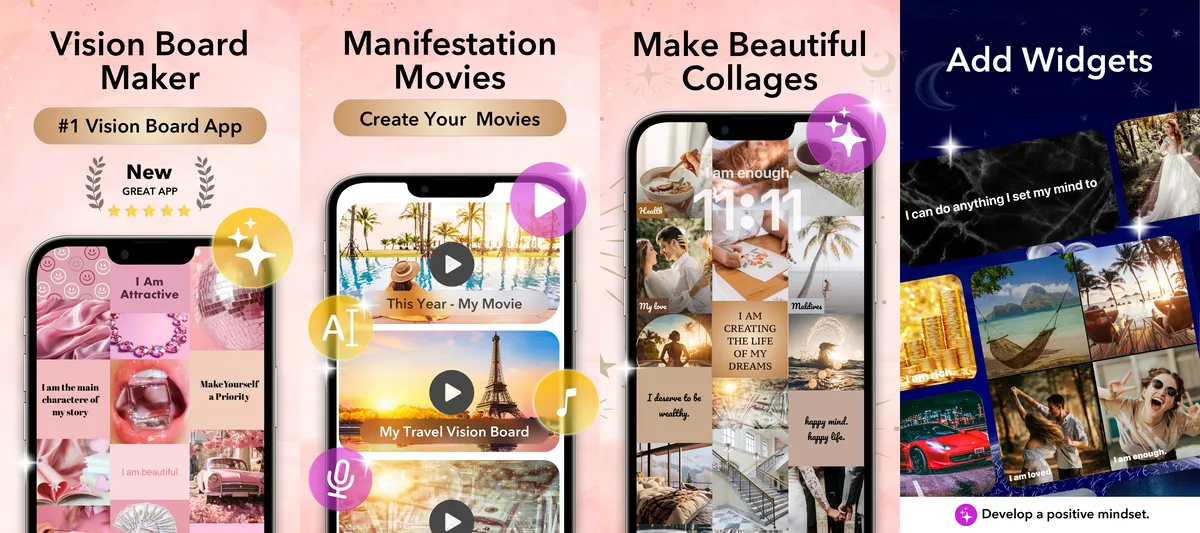
Build a board from your own photos or a large image library (love, family, health, wealth, gratitude and more), add your own text or pick from a big affirmation library, and choose from many grid layouts or a freeform canvas, with unlimited images per board.
Every board becomes a short movie with music from Apple Music or the built-in library and spoken affirmations, in your own recorded voice or one of many voices. Widgets, daily affirmations, streaks and a gratitude journal keep the board in front of you; Face ID and a PIN lock keep it private, and boards sync between devices.
✓ Pros
- Unlimited boards on the free plan
- Board movie with music and your own voice
- Widgets, streaks and a gratitude journal
- Grid layouts or a freeform canvas
- Face ID and PIN lock; syncs between devices
✗ Considerations
- iPhone and iPad only (no Android)
- No AI coach
Verdict: The most complete vision board app we tested, with unlimited free boards and the strongest daily ritual, at $19 a year for the extras.
2. Dreamer: Best for simple collages
Best for: a quick, clean phone-sized collage from a large photo library.
Not for: boards with more than nine images or a slideshow with audio.

Price (US App Store, checked Oct 2026): Free; about $20 per year (a lifetime option is also listed)
Free trial: 3 days · Rating: 4.7★ · Time to build a board: 10 min
View on the App Store
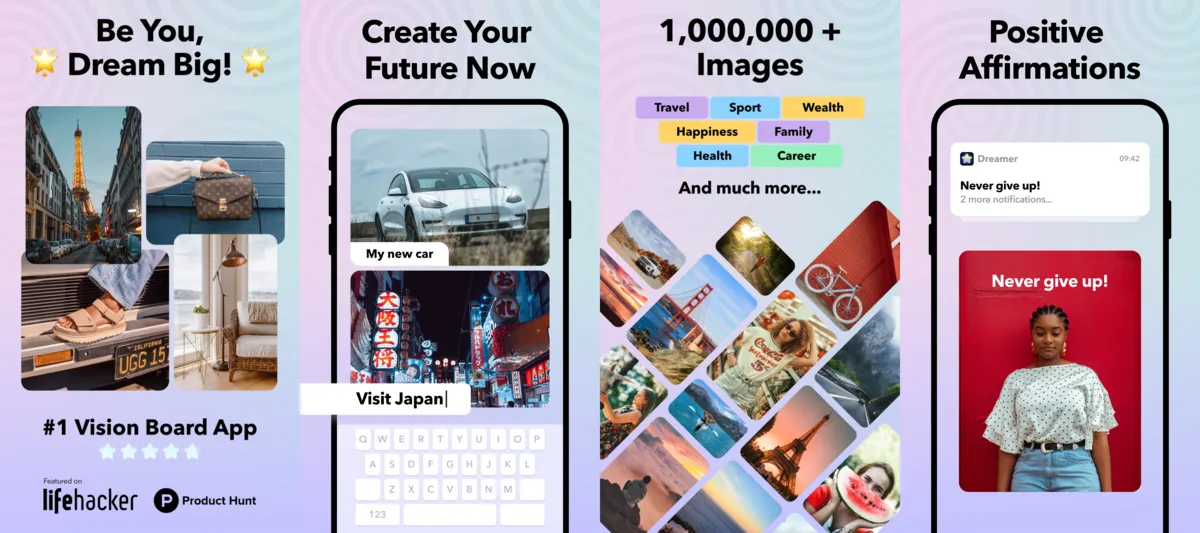
Dreamer makes screen-sized boards: pick one of six layouts, add up to nine images from its large image library and put text on them. Save the board as a lock-screen wallpaper, mark goals as done and plan next steps in the action list; widgets, affirmations and a diary help you keep going. It is available in 33 languages.
The catch is the free tier: the photo library, multiple boards and affirmations need the subscription, and only a limited number of boards stays viewable for free, even boards you made during a trial.
✓ Pros
- Quick, clean screen-sized boards
- Huge built-in image library
- Action list for next steps
- Widgets and a diary
✗ Considerations
- Up to 9 images per board
- Few boards stay viewable for free
- No built-in affirmation library
- Image library needs the subscription
Verdict: A polished, fast collage maker; the free tier is thin, so plan on the yearly plan (about $20).
3. Perfectly Happy: Vision videos with built-in libraries
Focus: turning library images and affirmations into a short vision video.
Not for: a static board you can save or share, because the video cannot be downloaded.

Price (US App Store, checked Oct 2026): Free; $59 per year or $11 per month
Free trial: 7 days · Rating: 4.8★ · Time to build a board: 15 min
View on the App Store
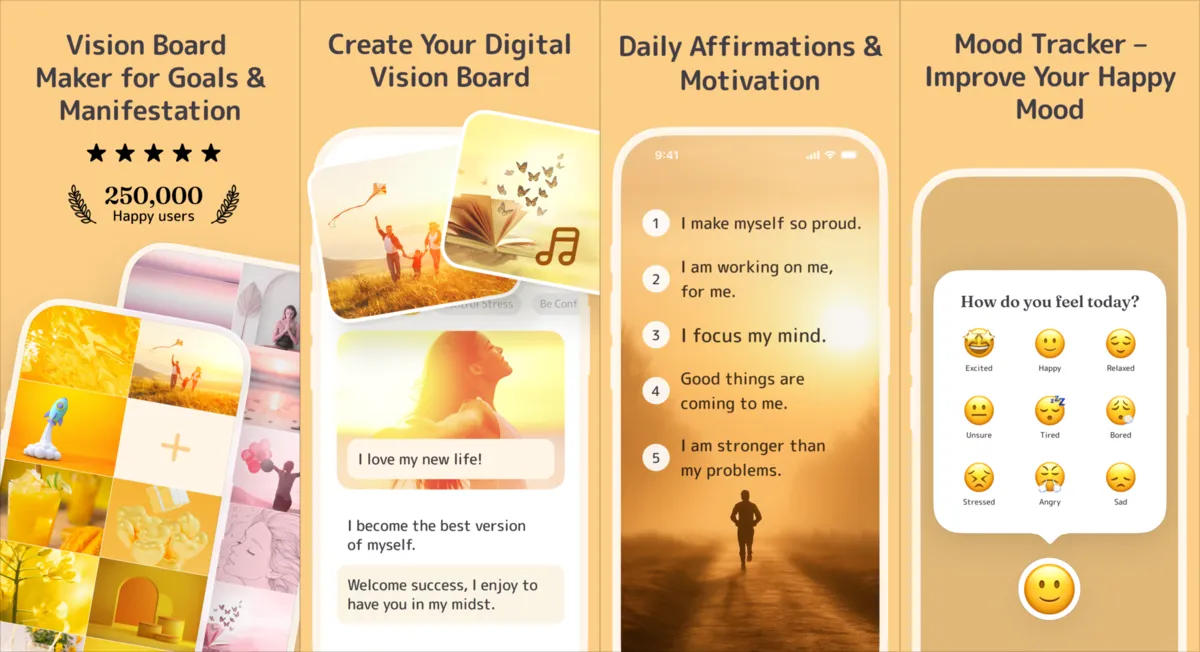
Perfectly Happy combines images and affirmations from its large photo and affirmation libraries into a slideshow-style vision video with preloaded music. It does not build a classic board with layouts, and the finished video cannot be shared or downloaded.
The free version covers a gratitude journal, mood tracking and your own affirmations in folders; switching affirmation categories means watching a 30-second ad, and the video feature needs the subscription.
✓ Pros
- Easy vision video
- Large image and affirmation libraries
- Helpful explanation videos
- Gratitude journal and mood tracking
✗ Considerations
- Video only, no classic board
- Video cannot be downloaded
- Ads in the free version
- $59 to $132 per year
Verdict: A well-made, video-first app at a higher price than most ($59 per year).
4. Horizons: Best for goals with an action tracker
Best for: planners who want boards, recurring actions and a journal in one place.
Not for: full-screen board viewing or home-screen widgets.

Price (US App Store, checked Oct 2026): Free; $13 per year, $4 per month or $20 lifetime
Free trial: none listed · Rating: 4.7★ · Time to build a board: 15 min
View on the App Store
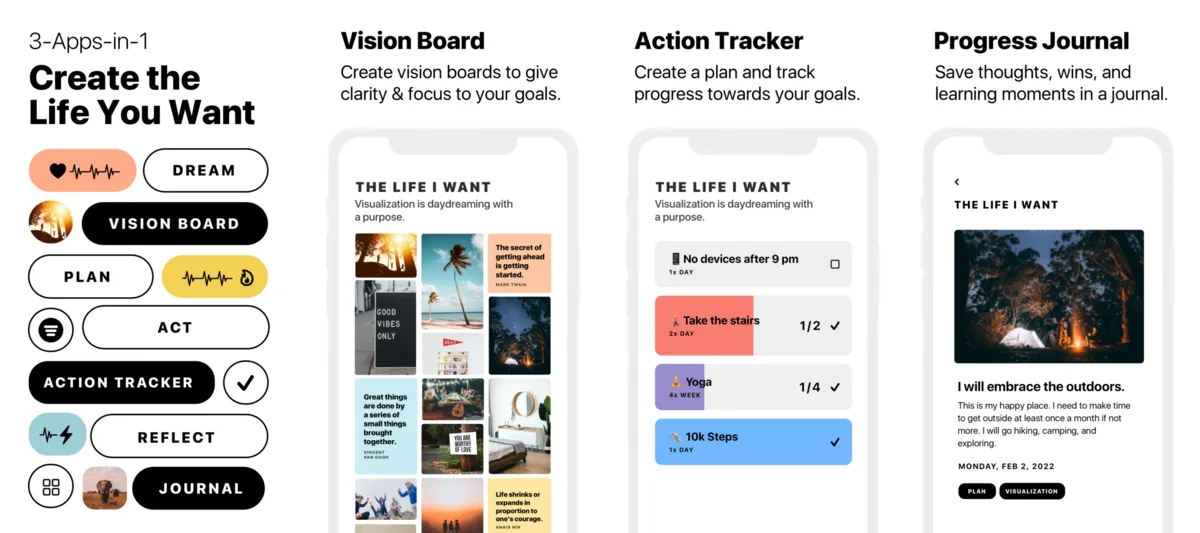
Horizons combines vision boards with an action tracker, a progress journal, affirmations and quotes. Keep several boards, one per life area, with images from a large Unsplash library and your own quotes. Actions repeat daily, weekly or monthly with a target count, and everything syncs across devices.
The main trade-off: boards cannot be viewed full screen, and reordering images can feel a little clunky.
✓ Pros
- Boards, action tracker and journal in one
- Large Unsplash image library
- Usable free version
- Syncs across devices
✗ Considerations
- No full-screen board viewing
- No widgets
- Some clunky interactions
- Not updated since November 2024
Verdict: A capable goal planner at a low price; note that it has not been updated since November 2024.
5. Vizzy: Best for free-form design
Best for: arranging images, quotes and affirmations freely and keeping the board on your home screen.
Not for: goal tracking, journaling or a slideshow.

Price (US App Store, checked Oct 2026): Free; “All Access” from $14.99 to $39.99 (plan periods not labelled)
Free trial: not stated in the App Store · Rating: 4.4★ · Time to build a board: 10–20 min
View on the App Store
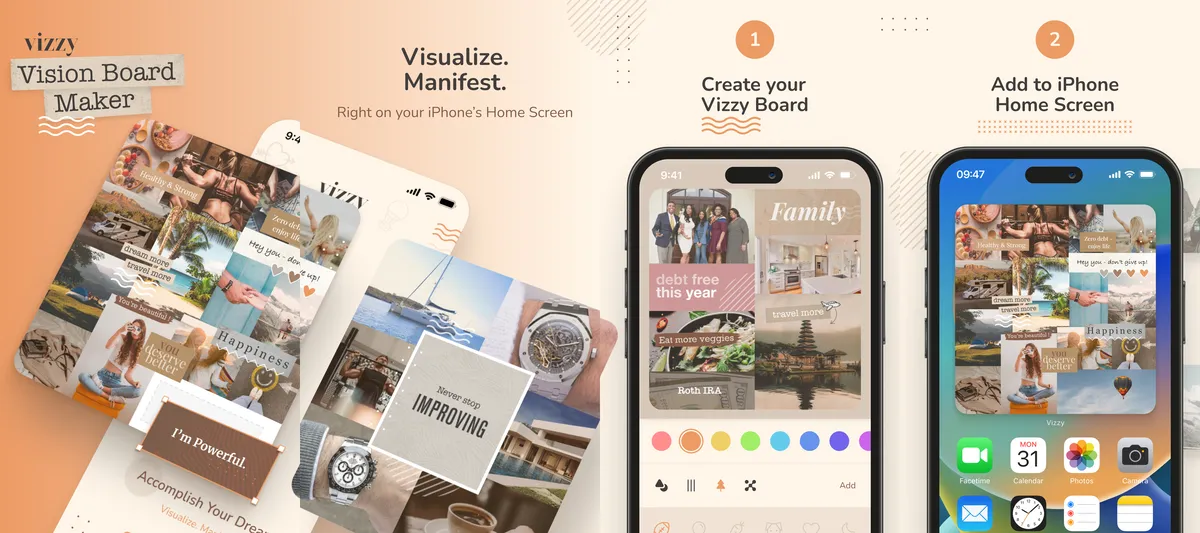
Vizzy (“2027 Vision Board Maker Vizzy” by Abstrakt, LLC) is made for designing a board and keeping it in sight. Mix library images with quotes and affirmations, arrange them freely on the canvas, pick colours, then put the finished board on your home screen as a widget; daily affirmations and reminders keep it in view.
It runs on iPhone and iPad, is available in English only and was updated in October 2026. Some recent App Store reviewers mention subscription and image-loading issues.
✓ Pros
- Free-form canvas
- The whole board as a home-screen widget
- Daily affirmations and reminders
- iPhone and iPad, actively updated
✗ Considerations
- No slideshow or audio
- No streaks, journal or goal tracking
- English only
- Some report subscription and image-loading issues
Verdict: A flexible board designer with a strong home-screen widget, lighter on daily-practice features.
6. Why Vision Board: Best for a simple photo grid with streaks
Best for: a no-frills list of photos and affirmations you scroll through daily, with streaks.
Not for: iPad users or anyone who wants to edit images later.
Price (US App Store, checked Oct 2026): Free with a photo limit; $30 per year or $4 per month
Free trial: 7 days · Rating: 4.7★ · Time to build a board: 10 min
View on the App Store
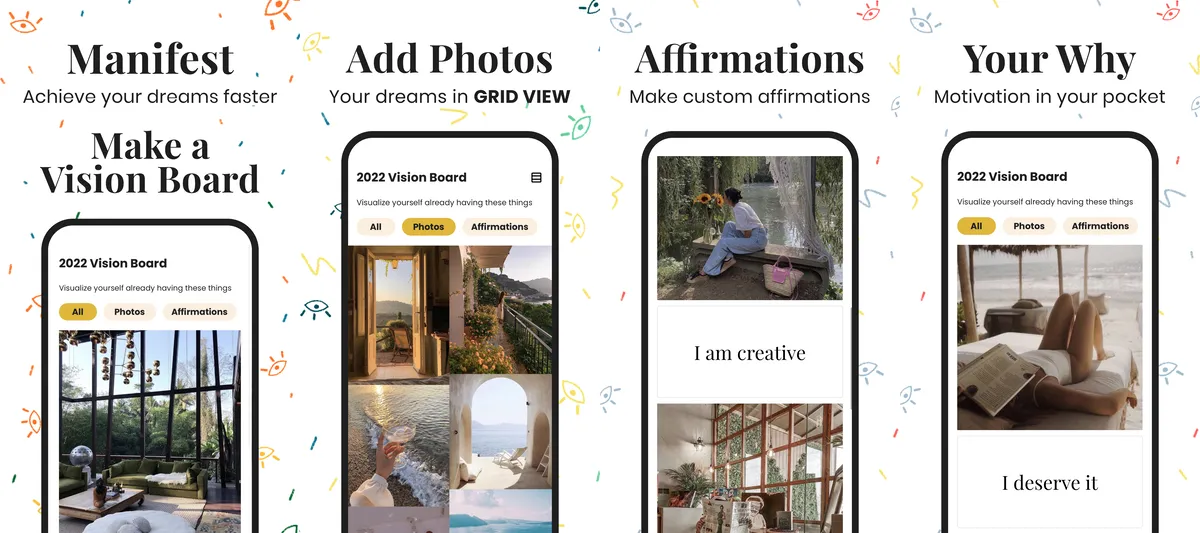
Why Vision Board keeps it simple: add your own photos (or a few from a small library) and write an affirmation for each, as a list. View the board as images with affirmations, images only (one or two per row) or affirmations only, or shuffle the images.
It counts the days you view your board and your streak, and offers a widget. You cannot edit an image later (you re-upload it); $30 a year unlocks unlimited boards and images.
✓ Pros
- Very simple to use
- Your own images and affirmations
- Streaks and a widget
- Three viewing modes plus shuffle
✗ Considerations
- No reordering or editing of images
- Small image library, no affirmation library
- iPhone only
- Last updated January 2025
Verdict: Simple and focused, with streaks and a widget; it was last updated in January 2025.
7. Vision Board 2027: Best for Feng Shui (Bagua) boards
Best for: setting goals across the nine Bagua life areas.
Not for: free use, since the store listing says core features need a subscription.

Price (US App Store, checked Oct 2026): Free download; core features $25 per year, $6 per month or $3 per week (lifetime $35)
Free trial: 3 days; ads unlock some features · Rating: 4.6★ · Time to build a board: 10 min
View on the App Store
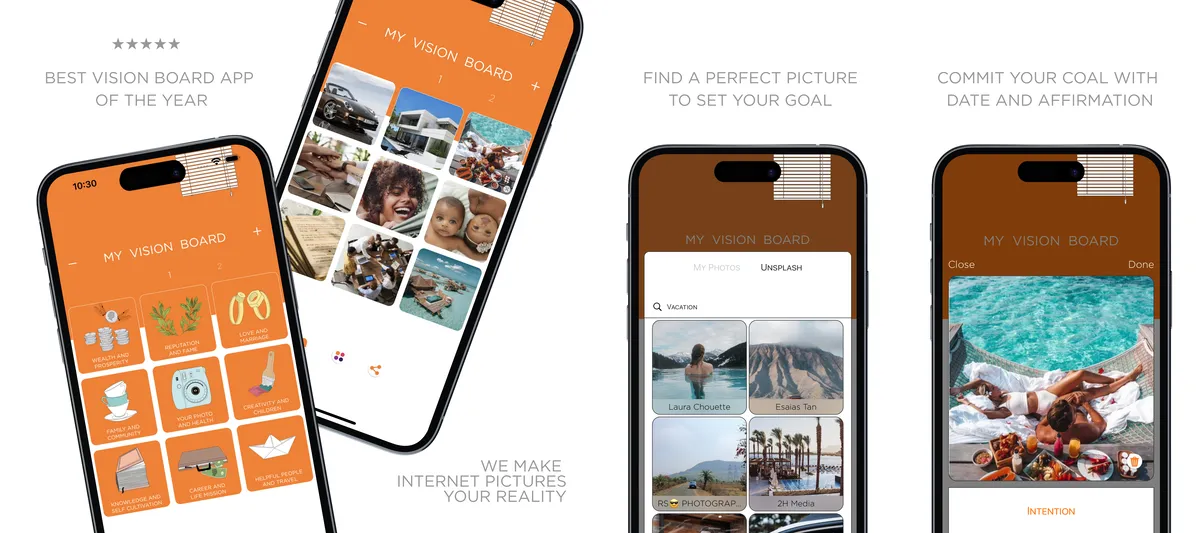
You fill nine fields, one per life area of the Feng Shui Bagua map, and give each a photo, a caption and a deadline. The interface is simple and quick to learn.
Subscribers get an Unsplash image library, unlimited boards, custom affirmations, board themes and no ads; there is no affirmation library. Without a subscription you can watch 30-second ads to unlock some features.
✓ Pros
- Goals built on the Bagua map
- Captions and deadlines per goal
- Widgets and iPad support
- Image library with the subscription
✗ Considerations
- Core features need a subscription
- No affirmation library
- Nine fields, nine images per board
- Ads to unlock features
Verdict: A distinctive Bagua-map approach with widgets and iPad support; budget for the subscription.
8. Vision Board & Goal Tracker: Best for aesthetic wallpaper boards
Best for: template-based mood boards you save as wallpapers.
Not for: iPad users or full-screen board viewing.
Price (US App Store, checked Oct 2026): Free for one board; $20 per year
Free trial: none listed · Rating: 4.7★ · Time to build a board: 10 min
View on the App Store
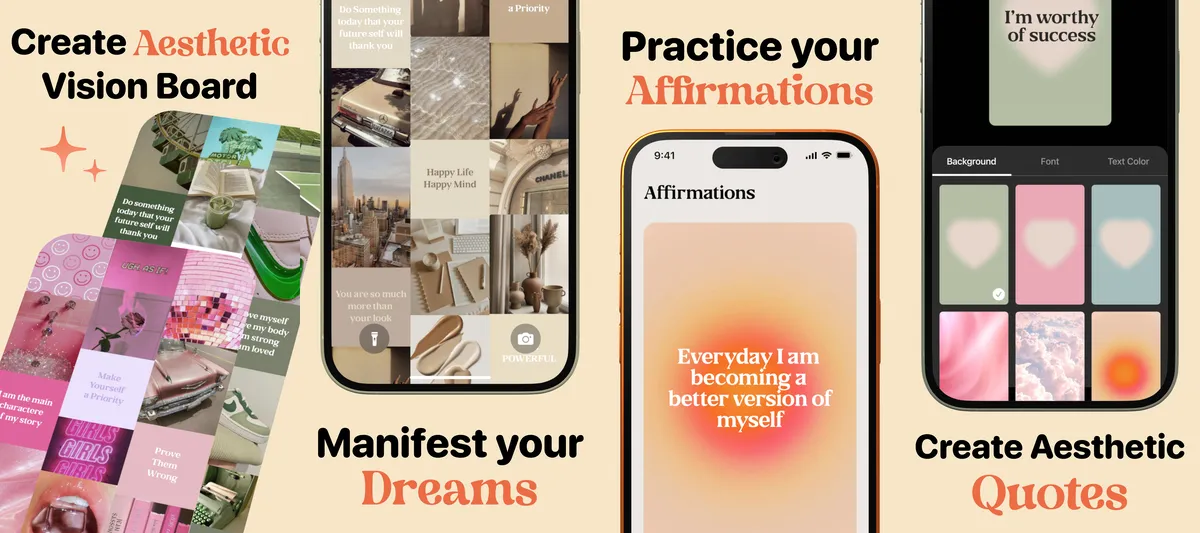
Vision Board & Goal Tracker (formerly Vision Board Aesthetic) starts with a board size and template. Fill every slot with your own photos or quotes, your own or pre-made, then long-press an image to crop, replace or delete it. There is no image library, and the result is closer to a mood board you save as a wallpaper.
It is ad-free and easy, with goals and a limited widget. One board is free, but you only learn at the end that saving more boards or adding your own quotes needs the $20 yearly plan.
✓ Pros
- Easy and ad-free
- Board sizes and templates
- Save as a wallpaper
- Goals and affirmations
✗ Considerations
- No built-in image library
- Every slot must be filled
- Paywall only shows at the end
- iPhone only; no full-screen viewing
Verdict: Easy and ad-free for aesthetic wallpapers; keeping more than one board needs the $20 yearly plan.
9. Wisher: Best for lessons and guided practice
Best for: lessons, affirmations and a meditation timer around a simple photo board.
Not for: text on your board or a built-in image library.

Price (US App Store, checked Oct 2026): Free for six boards; $50 per year or $7 per week
Free trial: 3 days (must be enabled) · Rating: 4.8★ · Time to build a board: 10 min
View on the App Store
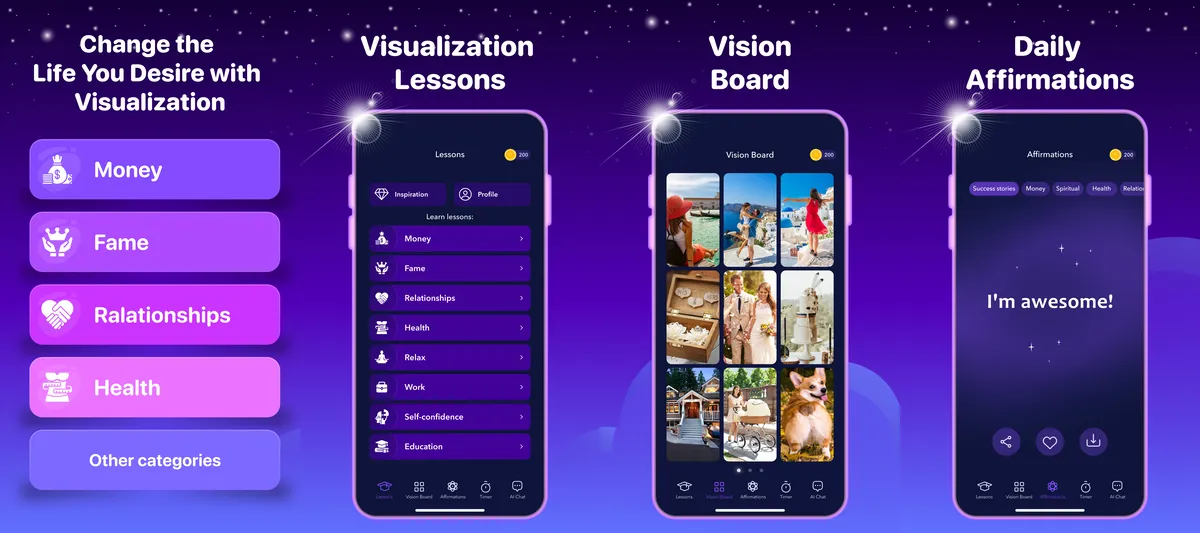
Wisher (listed as “Daily Affirmatons [sic] & Quotes”) pairs a photo board with lessons, affirmations, a meditation timer and an AI chat. Choose a layout, then add and crop your own photos, up to 13 per board; there is no image library and no text on boards.
Six boards and two layouts are free; more layouts, affirmation categories, lessons and the AI chat cost $50 a year or $7 a week. Some users find the layout busy.
✓ Pros
- Well-designed interface
- Six boards for free
- Lessons and a meditation timer
- AI chat for support
✗ Considerations
- Main features are paid
- No image library, no text on boards
- No widgets
- iPhone only
Verdict: Nicely designed with six free boards, but the main features cost $50 per year.
10. Hero21 Habit Tracker: Best for habits and goals next to a vision board (our app)
Best for: people who mainly want to track habits and big goals and keep a simple vision board next to them.
Not for: people who want a slideshow or mind movie of their board.
Our app: Hero21 is made by mHero21 e.U., the same company as Vision Board ++. It is scored with the same rubric as every other app.

Price (US App Store, checked Oct 2026): Free with unlimited boards and habits; $36 per year or $7 per month
Free trial: 7 days · Rating: 4.6★ (all storefronts) · Time to build a board: 10 min
View on the App Store
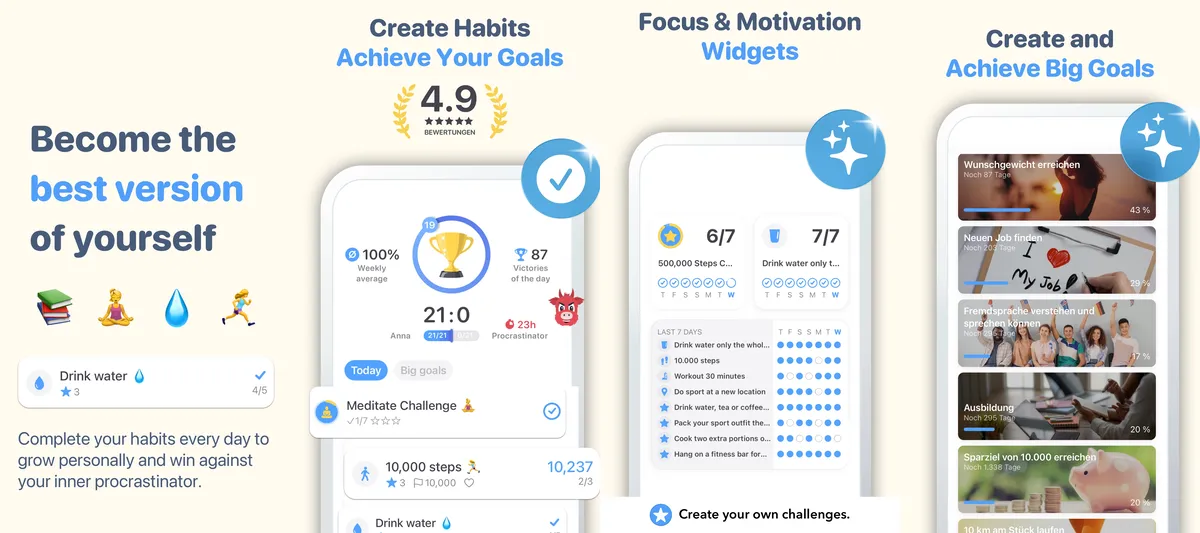
Hero21 (“Habit Tracker ++ Game Hero21”) is a gamified habit tracker with big goals and milestones, weekly and monthly overviews and automatic step counting via Apple Health.
Its vision board uses your own photos or a large library, with text and affirmations, 21 layouts and up to 12 images per board; save it as a wallpaper. Unlimited boards and habit tracking are free; guided boards need the subscription.
✓ Pros
- Free boards, 21 layouts
- Habit tracker and big goals
- Automatic step counting
- Large built-in image library
✗ Considerations
- Up to 12 images per board
- No affirmation library
- No vision board widget
- Last updated May 2023
Verdict: A habit and goal tracker with basic vision board features rather than a full vision board app; it was last updated in May 2023.
Also compared: why these didn’t make the top 10
- Myla (Manifest & Vision Board), 4.8★: now built around manifestation methods (369 method, Solfeggio sounds) more than board making.
- VisuApp, 4.7★: one-time purchases instead of a subscription, but not updated since September 2023.
- Visbo, 4.5★: also on Android, but not updated since December 2024 and the smallest rating base of the group (314 ratings).
- Vision Board (four life areas): the free version gives one board with four images from a small library; it scored 10% in our review.
Which app should you choose?
Start with the one thing you want the app to do every day, then pick the matching app. Price and platform are in the quick table at the top.
| If you want… | Choose |
|---|---|
| Watch your board every day as a movie with music and your own voice | Vision Board ++ |
| The most features for free (unlimited boards) | Vision Board ++ |
| A quick, clean photo collage | Dreamer |
| Full design freedom and the board on your home screen | Vizzy |
| Goals broken into daily, weekly or monthly actions | Horizons |
| A board built on the Feng Shui Bagua map | Vision Board 2027 |
| A simple photo-and-affirmation list with streaks | Why Vision Board |
Feature comparison: the 10 best vision board apps
| App | Image library | Affirmation library | Slideshow with music | Widgets | Streaks | Journal | Sync |
|---|---|---|---|---|---|---|---|
| 1. Vision Board ++ | yes | yes | yes | yes | yes | yes | yes |
| 2. Dreamer | yes | no | no | yes | no | yes | yes |
| 3. Perfectly Happy | yes | yes | yes | yes | no | yes | yes |
| 4. Horizons | yes | no | no | no | no | yes | yes |
| 5. Vizzy | yes | limited or paid | no | yes | no | no | no |
| 6. Why Vision Board | limited or paid only | no | no | yes | yes | no | no |
| 7. Vision Board 2027 | limited or paid | no | no | yes | no | no | no |
| 8. Vision Board & Goal Tracker | no | no | no | limited or paid | no | no | no |
| 9. Wisher | no | yes | no | no | no | no | no |
| 10. Hero21 Habit Tracker | yes | no | no | no | no | no | no |
How we choose the best vision board apps
We compared 13 iOS vision board apps on the same criteria, covering price, usability, audience, vision-board type, features (slideshow, affirmations, widgets, streaks, journal, progress tracking), platform availability, and cross-device sync. The feature comparison above shows the criteria that matter most day to day; the process below explains how ratings and review concerns were sourced. Myla, Visbo and VisuApp were compared on the same criteria; why they are not in the top 10 is explained under “Didn’t make the cut”.
Maria’s hands-on use of the 10 reviewed apps (see the introduction) is complemented by store data and 828 App Store reviews.
Ratings-count methodology
Rating counts (for example 9,602 for Vision Board ++) are the sum of App Store ratings across all 175 App Store storefronts, pulled on 22 October 2026, using the same method for every app. Star ratings are the US App Store averages, except Hero21, whose US average rests on two ratings, so we show its all-storefront average.
Review-summary source
Concerns attributed to reviewers (“some reviewers report …”) come from a 2026 corpus of 828 App Store reviews of 5 apps. A concern was only included when multiple recent reviewers raised it; one-off complaints were excluded.
Selection criteria
We evaluated each app against the same criteria:
- Price — subscription cost, one-time fee, or free tier.
- Usability — onboarding flow, layout discoverability, time to first board.
- Creation — image library, affirmations library, layout variety, captions and text support.
- Customization — layouts, colours, fonts, freeform canvas.
- Manifestation features — slideshow, audio, widgets, streaks.
- Review & reflection — progress tracking, journal.
- Sync — cross-device and iPad support.
- Ratings — App Store rating and harmonised rating count (see above).
Disclosure
We make Vision Board ++ and Hero21 (“Habit Tracker ++ Game Hero21”); both are published by mHero21 e.U. To counter-balance that, every competitor row is scored from the same public App Store data and against the same rubric. Where a competitor is the better fit for a specific audience, we say so.
Frequently asked questions
What is the best free vision board app?
Vision Board ++ is the best free vision board app we tested: the free version lets you create unlimited vision boards on iPhone and iPad, add your own photos or pick images from the built-in library, choose from many layouts and add text and affirmations. Only the full music slideshow, the complete affirmation library and voice recording need the $19-a-year subscription. Among the other apps, Horizons has a usable free version with multiple boards and an action tracker, and Wisher lets you build six boards for free. Dreamer covers the basics but keeps its photo library and extra boards behind a subscription. We make Vision Board ++, so every app is scored against the same public App Store data and the same criteria.
What is the best vision board app for iPhone?
Vision Board ++ is our pick for the best vision board app for iPhone in 2027: it has a 4.9-star App Store rating, runs natively on iPhone and iPad, and combines photo boards, affirmations, home-screen widgets, streaks and a vision-board movie with music and your own voice. It syncs across devices with iCloud and costs $19 per year on top of a free core version. If you only want a quick, clean collage, Dreamer is a simple alternative (4.7 stars, about $20 per year). If you want full design freedom and your board on the home screen, Vizzy is worth a look (4.4 stars). We make Vision Board ++; every other app was scored on the same criteria.
Can I make a vision board on my phone?
Yes, you can make a vision board on your phone in about 5 to 20 minutes with a vision board app. Install an app such as Vision Board ++, Dreamer or Vizzy, pick a layout, add your own photos or images from the built-in library, and write a short affirmation or caption for each goal. Most apps then let you save the board as a wallpaper or add it as a home-screen widget, so you see it every time you unlock your phone. Apps with a slideshow feature, such as Vision Board ++, can also play your board as a short movie with music. For a step-by-step walkthrough, read our guide on how to create a vision board.
Can ChatGPT make a vision board?
Partly: ChatGPT can generate vision board images, collages and affirmation ideas from a prompt, but it cannot keep the board in front of you every day. It is useful for brainstorming goals, writing affirmations in your own words or creating a single collage image to save as a wallpaper. What it does not offer is what makes a vision board work over time: no home-screen widgets, daily reminders, streaks, affirmation playback or slideshow, and changing one picture usually means regenerating the whole image. A practical approach is to use ChatGPT for ideas and wording, then build the board in a vision board app with your own photos. Our guide on how to create a vision board walks through the steps.
Do vision board apps actually work?
Vision board apps work when they keep your goals visible and turn them into daily action; the app itself does not make anything happen. Research on goal achievement points to drivers a good app can support: specific, challenging goals (Locke & Latham), belief in your own ability (Bandura), intrinsic motivation (Deci & Ryan), social support (Cohen) and positive reinforcement (Skinner). Widgets, reminders and streaks make you look at your goals daily, captions and deadlines make them concrete, and progress tracking rewards each step. Visualization alone is not enough, so pair your board with clear next steps and goals that match your values.
Which vision board apps have home-screen widgets?
Six of the 13 apps we compared offer full home-screen widgets: Vision Board ++, Dreamer, Perfectly Happy, Vizzy, Why Vision Board and Vision Board 2027. Vision Board & Goal Tracker and Visbo offer more limited widgets. A widget puts your vision board or a daily affirmation on your home screen, so you see your goals every time you pick up your phone instead of having to remember to open the app. That daily exposure is the main reason we weight widget support when scoring. If widgets matter most to you, Vision Board ++ and Vizzy both put the whole board on the home screen, and Vision Board ++ also offers lock-screen widgets.